Write a whole prescription from the keyboard

Type a Chinese name, pinyin initials or product code, press Enter to add, and carry on with the next herb. Each result shows stock and grams already added. Common prescriptions go in with one click, and saving deducts stock automatically.

See how it works
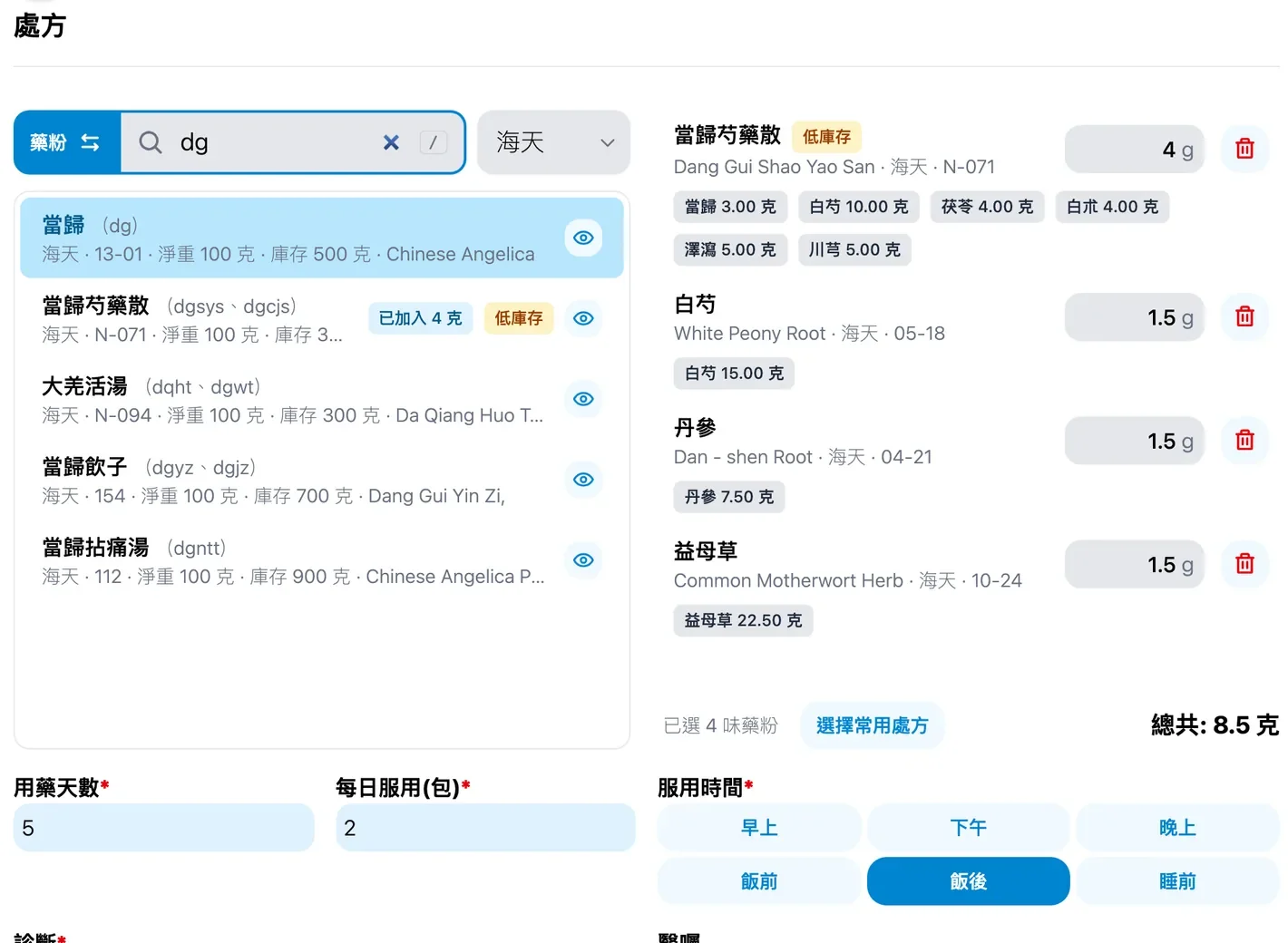
Medicloud screen: Write a whole prescription from the keyboard (fictional data)

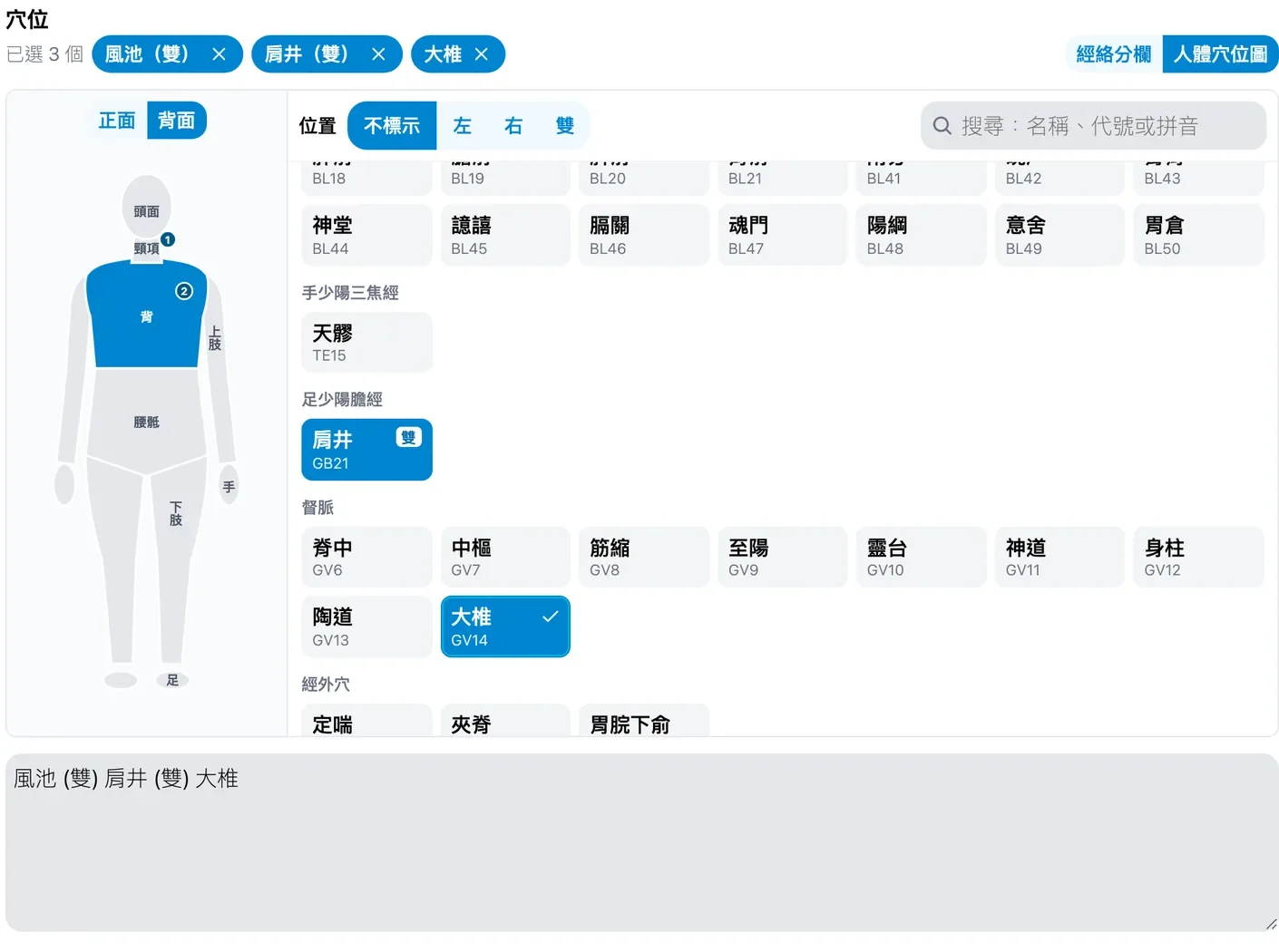
Acupoints by body map or meridian

409 points. Pick them meridian by meridian or tap a region on the front or back body map. Choose left, right or both once and every tap adds the point with that side, or search by name, code or pinyin.

See how it works
Medicloud screen: Acupoints by body map or meridian (fictional data)

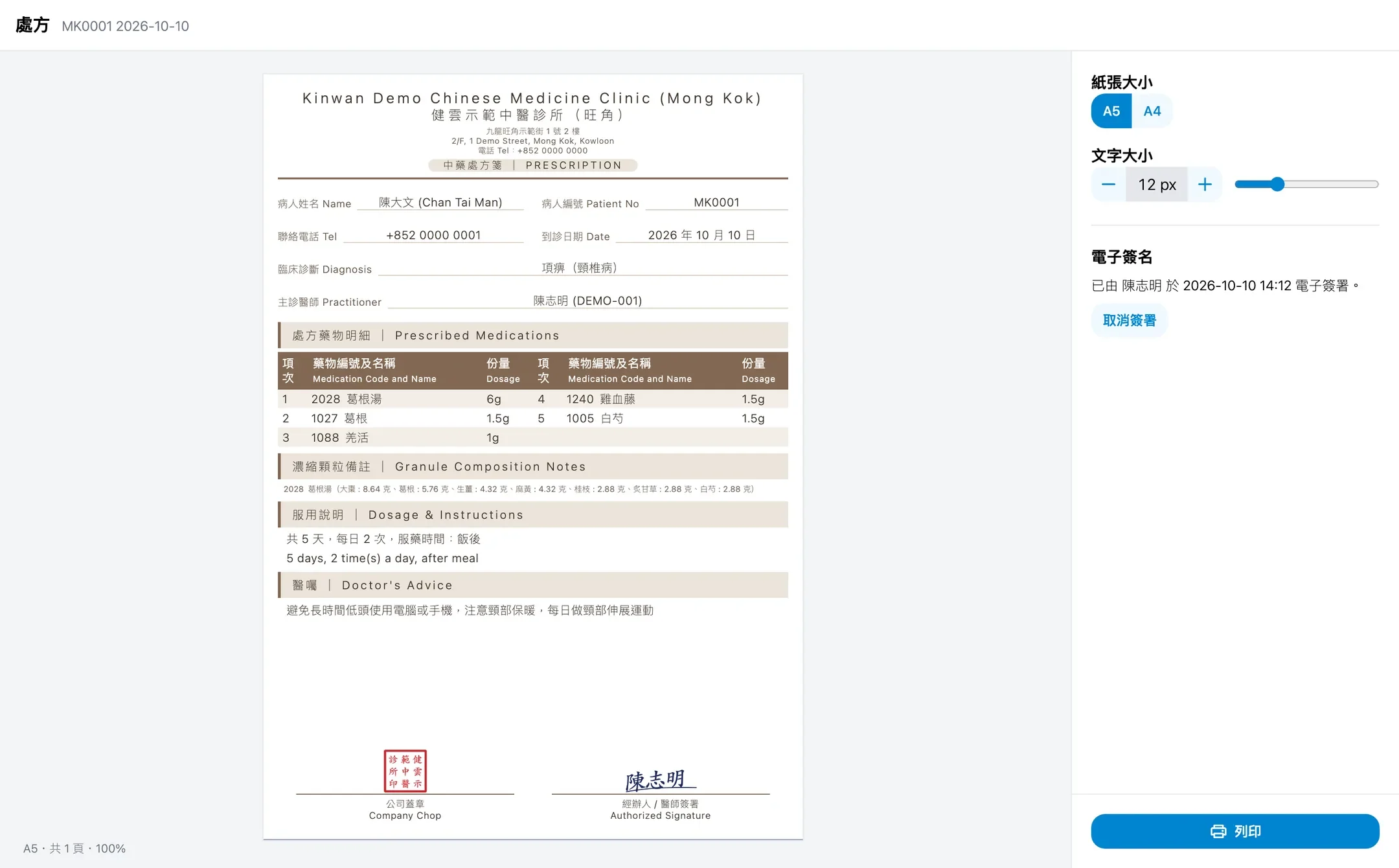
Clinic chop and doctor e-signature

On supported print templates, prescriptions, receipts, sick-leave and attendance certificates can carry the doctor's e-signature, and prescriptions, receipts and insurance invoices the clinic chop. If a signed document changes, the signature stops printing until the doctor signs again.

See how it works
Medicloud screen: Clinic chop and doctor e-signature (fictional data)

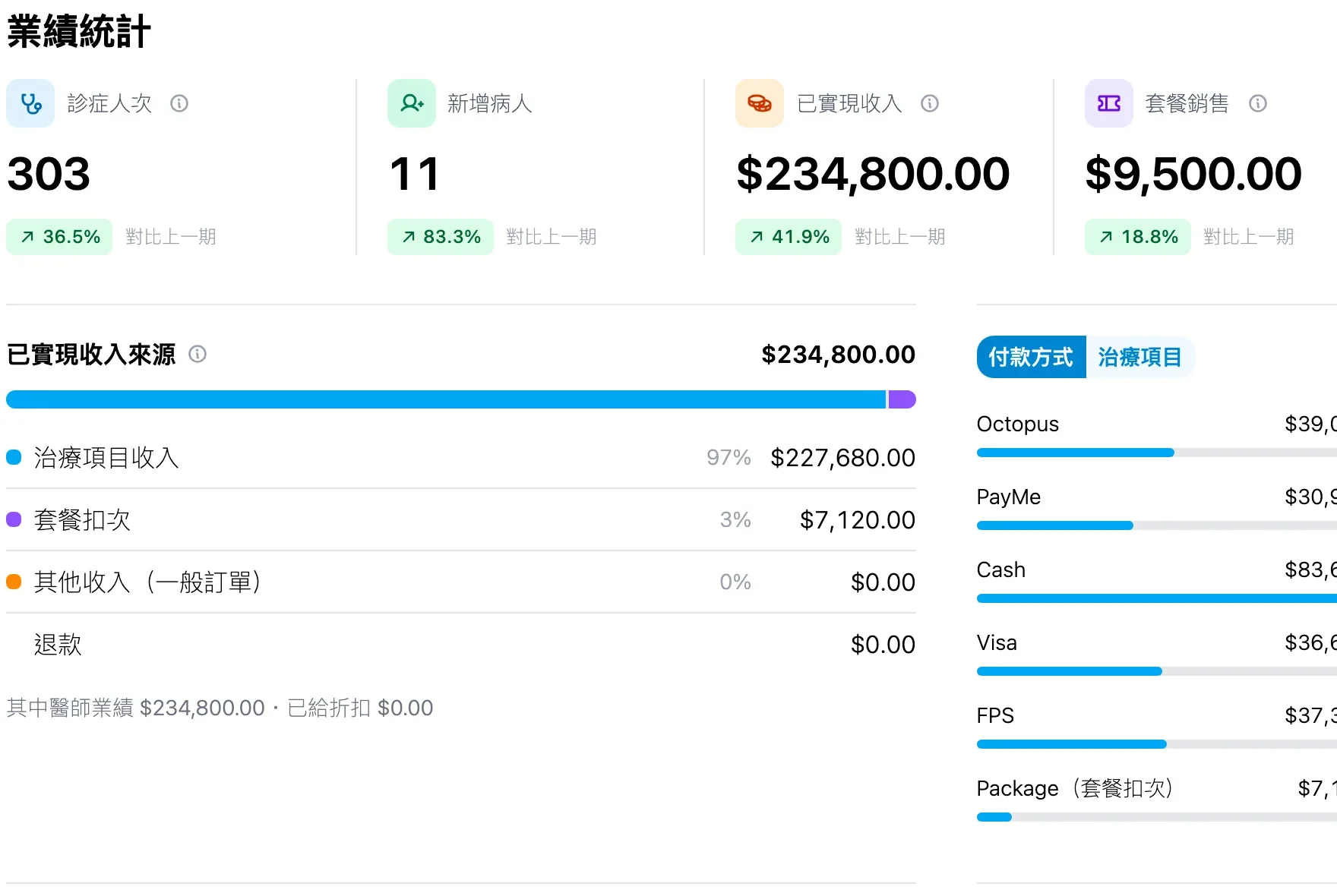
Revenue reports and doctor performance

See realised revenue, cash collected and package prepayments by month, week or day. Break them down by doctor, payment method and treatment, compare with the previous period, and export to Excel or Word.

See how it works
Medicloud screen: Revenue reports and doctor performance (fictional data)

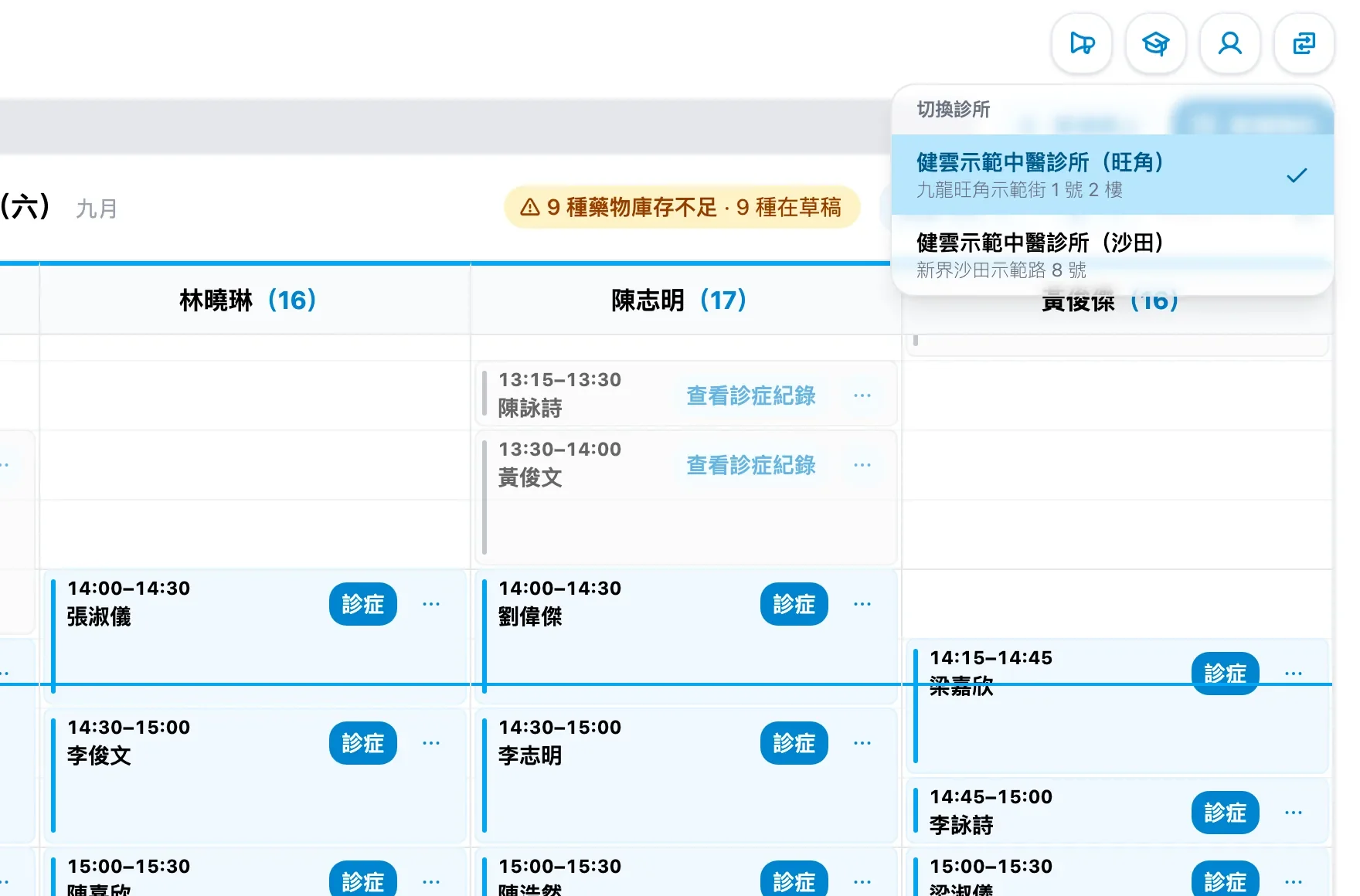
Several clinics, one login

Staff switch clinic from the top bar, and each browser tab can work in a different clinic. Admins can copy patients, with their past records, to another branch. Stock and reports are kept per clinic.

See how it works
Medicloud screen: Several clinics, one login (fictional data)

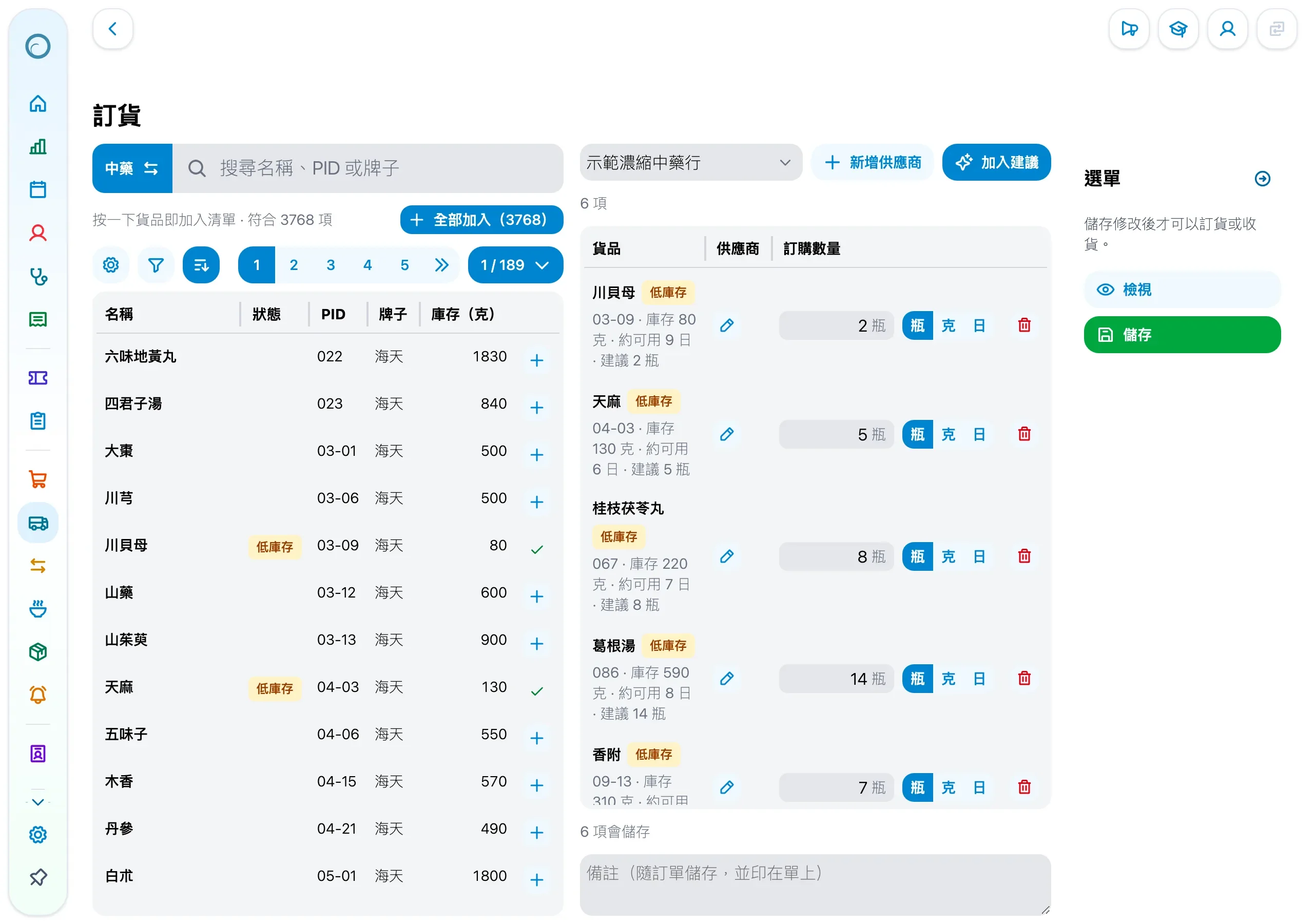
Order from your own suppliers, with quantities from usage

Medicloud works out how many days each item's stock will last at its recent usage and flags what runs low on the home page. One click drafts orders by each item's default supplier with suggested quantities; send them by WhatsApp, email or print, and Receive stocks the goods in when they arrive. Order from any supplier you use; Medicloud does not sell herbs.

See how it works
Medicloud screen: Order from your own suppliers, with quantities from usage (fictional data)

Every feature

One price includes every feature below.

These are all the features clinics can use in Medicloud today, grouped by the work they cover.

See what's new

Prescribing & TCM records

  • Prescribe with the keyboard, choosing raw herbs or granules for each prescription.
  • Find herbs by the initials of their Mandarin pinyin or their Cantonese Jyutping.
  • Each doctor saves common prescriptions and loads them again in one step.
  • Mark each herb's decoction method, such as decocting first or adding later, while days, packs and total grams are worked out for you.
  • See each herb's stock while choosing it.
  • Pick acupoints on a body map or by meridian, marked left, right or both sides.
  • TCM records cover chief complaint, tongue, pulse, pattern, treatment principle and more, and each doctor chooses which fields to show.
  • Start a follow-up visit's record from a past one.
  • Save common text for advice, history and decoction instructions, and pick it while writing.
  • Medical history and allergies are kept with the record and flagged beside the patient's appointment on the home page.
See how it works

Appointments, patients & billing

  • Create, confirm and cancel appointments, with a warning when times overlap.
  • The home page shows today's appointments in a column per doctor, with waiting and seen counts.
  • The home calendar shows a day, a week or a month, for the practitioners you tick, with each day's lunar date.
  • Patient details include Chinese and English names and contact details, with quick search from the home page.
  • Receipts take charge items and discounts, with split payments, insurers and refunds.
  • Each clinic sets its common charge items, payment methods and insurers.
  • Print insurance invoices and sick-leave and attendance certificates.
  • Sell retail products, with stock deducted automatically.

Packages & treatment courses

  • Keep a package catalogue, and redeem sessions on each visit's receipt after a sale.
  • Take package payments in instalments, refund or void a package, and get sessions back on a refund.
  • Each use of a package links to its receipt, and an order's payment methods can still be changed after it is confirmed, with every change logged.
  • Sessions patients have left in a previous system can be carried over when you switch.

Printing, chop & signature

  • Several A5 and A4 templates for prescriptions and receipts, with your logo, Chinese and English names and registration number.
  • Documents carry the clinic chop.
  • Doctors draw or upload their signature and sign each document.
  • Crop and rotate a phone photo of the chop or signature inside the system.
See how it works

Herbs & inventory

  • Built-in catalogues of raw herbs and granules by brand.
  • Add your clinic's own drugs and ingredients.
  • Show drug names in Chinese, English or Latin.
  • Prescribing deducts stock automatically, and Medicloud works out how many days each item's stock will last at its recent usage, flagging what runs low on the home page.
  • The stock alerts page lists each item's usage and days left, and an item can have its own days or a fixed quantity.
  • Order from your own suppliers: quantities are suggested from usage, the order goes out by WhatsApp, email, print or copied text, and Receive stocks the goods in.
  • Each drug and product can have several suppliers and a default one, and the home page's low-stock warning drafts orders by default supplier in one step.
  • Stock-in and stock-take support saved lists, CSV upload and voiding.
  • Manage stock of non-drug products too, with CSV import and export.
See how it works

Management, permissions & reports

  • Manage several clinics on one account, one clinic per browser tab.
  • Copy a patient, records included, to another clinic.
  • Statistics compare periods and show clinic-wide or personal figures.
  • Export reports to Excel and Word.
  • Customise permissions by role, and copy an existing role to start a new one.
  • Limit a staff member to the patients assigned to them.
  • Switch off staff who leave: they can no longer sign in and take no staff place, while past records still show their name.
  • Staff with the permission choose or change a record's doctor; doing so for another doctor asks for confirmation and is logged on the record.
  • Each clinic includes 10 staff accounts; contact us if you need more.
See how it works

Languages, devices & everyday use

  • The interface is in Traditional Chinese and English, and each staff member switches from the user menu at any time.
  • The interface wears the 2026 Droplet look, with a floating rounded menu and capsule buttons; staff who prefer the earlier look switch back to Classic under Appearance.
  • Dark mode is easier on the eyes at night or in a dim room, and can follow the device's setting; printouts stay the same.
  • Use it on a computer, tablet or phone; the layout fits the screen.
  • Add Medicloud to a phone's or computer's home screen from the browser and open it like an app.
  • A cloud system you sign in to through a browser, with nothing to install and automatic updates.
  • Every page has a guided tour, so new staff learn step by step.
  • Reset a forgotten password by email, with password rules that protect accounts.

FAQ

Questions clinics ask about the features

Does Medicloud have an English interface?

Yes. The interface is in Traditional Chinese and English, and each staff member can switch from the user menu at any time. Drug names can also show in Chinese, English or Latin. A Simplified Chinese interface is not available.

Can we use it on a phone or tablet?

Yes. Sign in through the browser on a computer, tablet or phone, and the layout fits the screen. You can also add Medicloud to your home screen from the browser and open it like an app, with no app store download.

Can we set different permissions for different staff?

Yes. Permissions are set by role: choose what each role may do, or copy an existing role and adjust it. You can also limit a staff member to the patients assigned to them. Staff see only the actions they may take.

Can we manage treatment packages?

Yes. Keep a package catalogue, take payments in instalments, and redeem a session on the receipt at each visit. Packages can be refunded or voided, refunds return sessions, and package documents can be printed.

Can we order from our own herb suppliers?

Yes. Medicloud does not sell herbs and does not tie you to a supplier. Add the suppliers you use in the clinic settings; when you order, quantities are suggested from usage, and you send the order yourself by WhatsApp, email or print. Receive stocks the goods in when they arrive.

Can we search herbs with Cantonese romanisation?

Yes. When prescribing, type the initials of an herb's Mandarin pinyin or its Cantonese Jyutping, whichever you are used to.

Can patients' remaining package sessions come across from our old system?

Yes. We import your data for free when you switch, including the sessions patients have left on packages in your previous system.

Where is our clinic's data stored, and is it secure?

Hong Kong clinics' data is stored on Amazon Web Services (AWS) servers in Singapore, and UK clinics' data in London. Every connection uses HTTPS; passwords are stored as salted hashes, never as text; repeated wrong passwords lock the account for a while. Each staff member's access is set by role and can be limited to their own patients, and uploaded files open only through links that expire within an hour.

Does Medicloud offer online booking or appointment reminders?

Not at the moment. Medicloud does not offer patient online booking or SMS or WhatsApp appointment reminders; clinic staff create and manage appointments in the system.

Fitted to your clinic

Free customization, including new features.

Tell us how your clinic works and we adjust receipt, certificate and prescription layouts, fields and workflow settings for free. New features your clinic needs, we also develop for free. For larger features, we first agree with you on feasibility and timing.

Switching includes free data import: we review your existing data and switching needs, then arrange the import with you.

Open the one-page summary to print or share

Try it before deciding.

First three months free, no credit card. Then HK$500 per clinic per month.

See pricing and switching support