Online booking and online consent forms
Clinics in Hong Kong can open online booking. Patients ask for an appointment on their phone at any time, and the clinic confirms it in the same system and tells the patient through its own WhatsApp. New patients can register themselves before they book, and sign consent forms online where a treatment needs one. Online booking is included in the monthly price.
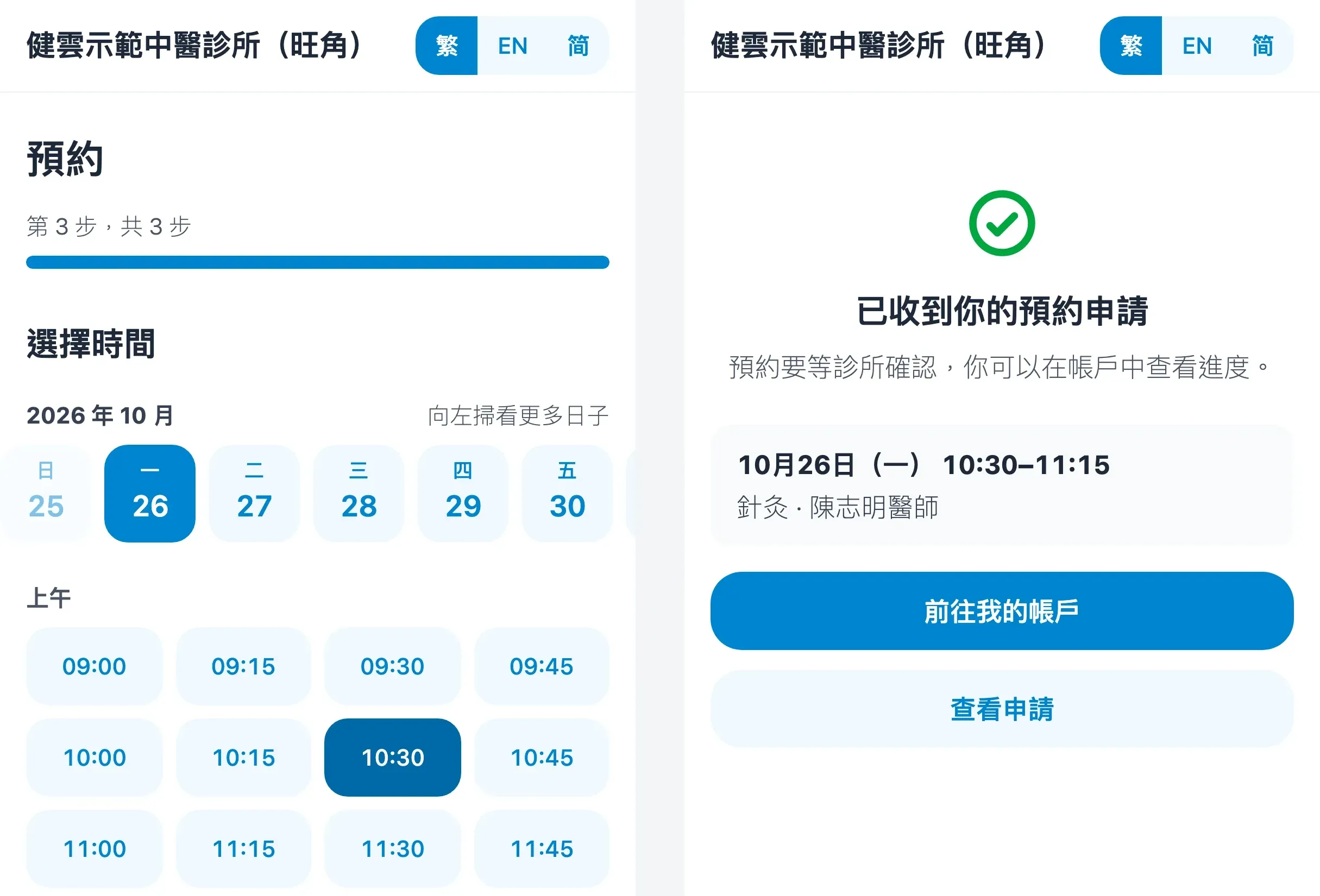
What it does
- Patients choose treatments, a doctor (or any doctor) and a time. Times follow each doctor’s hours, leave and existing appointments, so patients see only times that still have room.
- Each common treatment open to online booking has its own minutes; when a patient chooses several, the booking lasts their minutes together.
- The clinic sets how many hours ahead a booking must be made, how many days ahead patients may book, and until when patients may cancel themselves.
- Requests wait as pending on the Online booking page in the side menu until the clinic confirms them, and two patients can never take the last place at the same time.
- Medicloud sends patients no messages itself: once the clinic accepts or turns down a request, Tell the patient on WhatsApp opens the clinic’s own WhatsApp with a message and a link to the request.
- Online booking is for clinics in Hong Kong only, and Medicloud does not send automatic SMS or WhatsApp reminders.
Handling requests
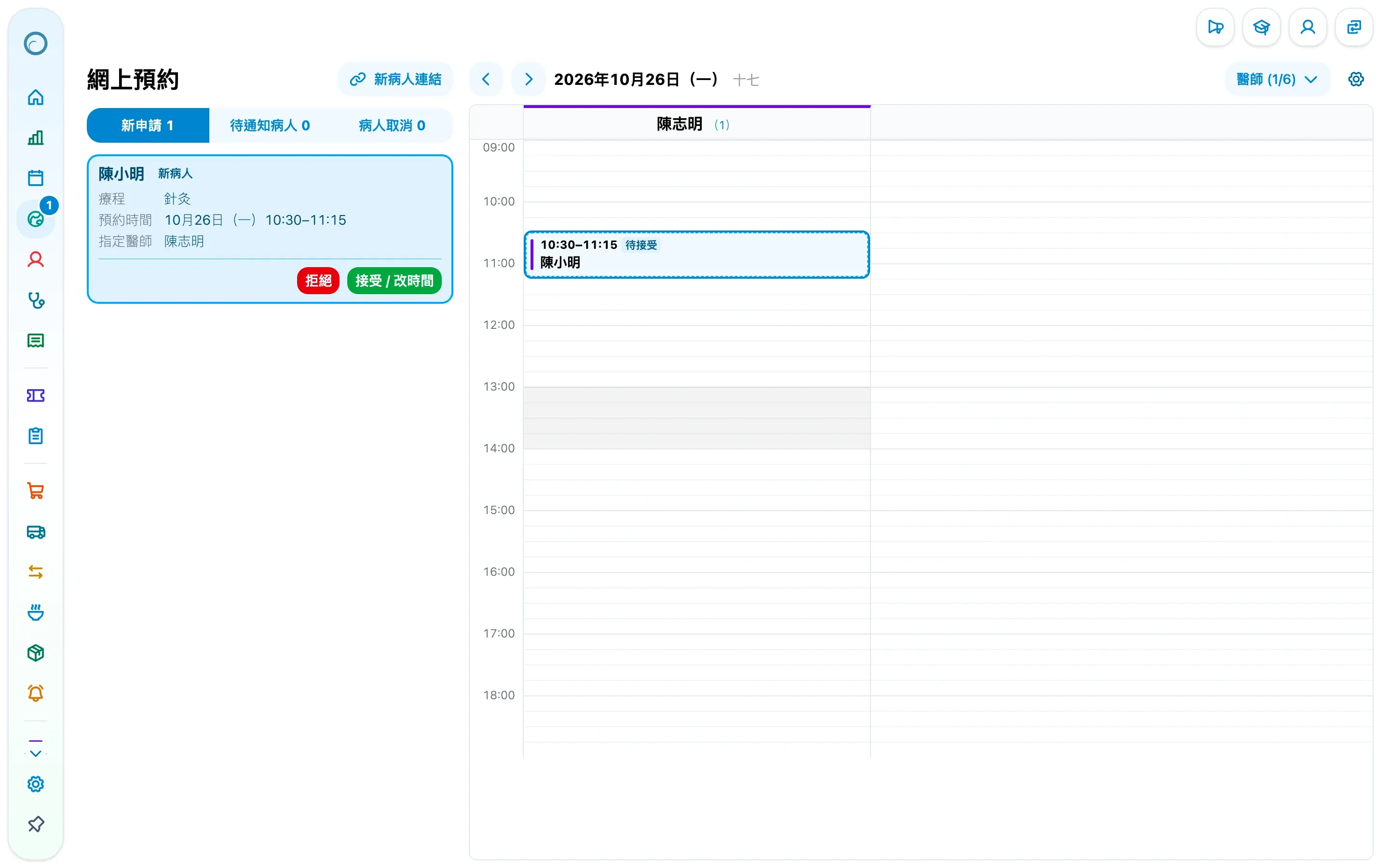
- New requests appear on the Online booking page and under To handle on the home page, marked when the patient is new, and marked as a possible duplicate when the clinic already has a patient with the same phone or identity document.
- Choosing a request shows that day’s calendar beside it, to compare with the other appointments.
- Accept / change time chooses the doctor and keeps the time asked for, or a time already agreed with the patient; Turn down cancels the request.
- Tell the patient on WhatsApp with the result; the patient also sees it on the request’s page. A request not handled by its time ends by itself.
New patients register themselves
- New patient link, on the home page, the patient list or the Online booking page, copies a link, sends it by WhatsApp, or shows it as a QR code for a patient at the counter.
- After signing in with their email, the patient fills in three steps: personal details, health (including long-term illnesses, long-term medication, allergies and medical history) and the declaration, and can ask for an appointment at the same time.
- Submitting makes them one of the clinic’s patients, so staff type nothing in again. A link works once and lasts seven days unless the clinic sets another.
- The clinic edits the declaration and the “how did you hear of us” answers under Online booking in the clinic settings.
Patient accounts
- Patients sign in with a code sent to their email, with no password.
- The account lists the patient’s appointments at the clinic, including those staff booked, and lets the patient cancel before the clinic’s deadline or book again.
- Existing patients pair their account with their record through a link from the clinic.
- The patient website is in Traditional Chinese, English and Simplified Chinese.
Consent forms signed online
- A common treatment names the consent forms it needs, such as the acupuncture consent form.
- Under Consent forms in the clinic settings, the clinic edits the wording, how patients sign (a drawn signature or their typed full name) and how many months a form lasts, with a preview of what patients see.
- The calendar marks appointments still unsigned, and the appointment and patient menus offer a Consent form link to copy or send by WhatsApp.
- Patients sign each form on their phone; a legal representative can sign for a minor or a patient who cannot sign.
- Signed forms stay with the patient’s record and can be printed, and patients with a verified email receive a copy.
Before opening
- Under Consultation and prescription in the clinic settings, give the common treatments their minutes and tick Open to online booking.
- Set each doctor’s hours.
- Open online booking under Online booking in the clinic settings.
To handle on the home page reminds you of any of these not yet done, one click from each.
New to Medicloud? Try it free for 3 months, no credit card